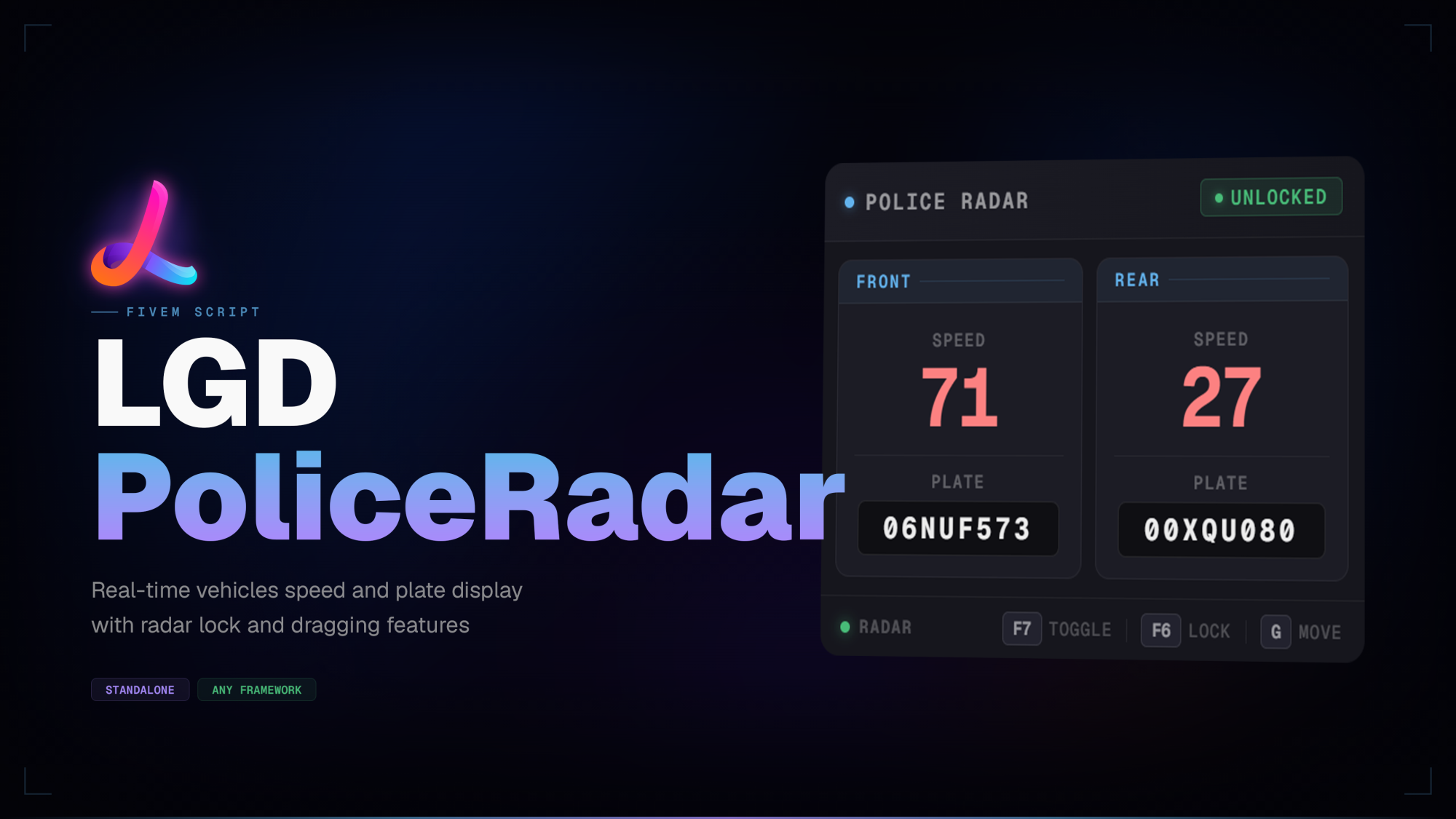
<p><strong>LGD PoliceRadar</strong> is an always-on radar HUD that displays the speed and plate of vehicles ahead and behind you — directly on screen, no menu required. The panel activates automatically whenever an emergency vehicle is entered and fades out on exit, keeping the experience entirely hands-off.</p>
<p>The panel is fully draggable and remembers its position between sessions. A minimum speed threshold can be set with <code>/radarspeed</code> — the radar locks itself the instant any detected vehicle meets it, freezing the reading for review without any manual input.</p>
<hr />
<h2>Features</h2>
<ul>
<li>
<p><strong>Always-visible HUD</strong> — front and rear speed readings plus license plates are displayed at a glance with no menu to open</p>
</li>
<li>
<p><strong>Framework agnostic</strong> — works on QBCore, QBX, ESX, standalone, and any other framework with zero configuration</p>
</li>
<li>
<p><strong>Configurable notifications</strong> — choose between <code>ox_lib</code>, <code>QBCore</code>, or a fully custom provider; the notification bridge lives in the unencrypted <code>framework/client.lua</code> so it can be swapped without touching any encrypted file</p>
</li>
<li>
<p><strong>Front & rear detection</strong> — independent capsule raycasts cover both directions simultaneously</p>
</li>
<li>
<p><strong>Lock mode</strong> — freeze the current readings with a keybind to record a speed; the badge switches to red to indicate locked state</p>
</li>
<li>
<p><strong>Auto-lock / speed clocking</strong> — set a minimum speed threshold with <code>/radarspeed [speed]</code>; the radar locks itself the instant any detected vehicle meets or exceeds it</p>
</li>
<li>
<p><strong>Smooth fade transitions</strong> — the panel fades in when entering an emergency vehicle and fades out when leaving</p>
</li>
<li>
<p><strong>Draggable panel</strong> — hold a configurable key to enable the cursor and drag the radar anywhere on screen; position is saved across sessions</p>
</li>
<li>
<p><strong>Rebindable keybinds</strong> — all three keybinds (toggle, lock, drag) are registered through <code>ox_lib</code> and can be rebound in GTA V's Key Bindings menu</p>
</li>
<li>
<p><strong>KMH and MPH support</strong> — speed unit is switched from the config with a single line</p>
</li>
<li>
<p><strong>Optimised</strong> — 0.00ms idle, 0.01ms in-vehicle with panel visible; scan loop runs only while inside an emergency vehicle.</p>
</li>
<li>
<p><strong>Support</strong> — Lifetime updates, 7-day-a-week personalized support via Discord.</p>
</li>
</ul>
<hr />
<h2>Dependencies</h2>
<p>ox_lib — Always</p>
<p>No framework dependency. No other requirements.</p>
<hr />
<h2>Installation</h2>
<ol>
<li>Drop <code>lgd-policeradar</code> into your resources folder</li>
<li>Add <code>ensure lgd-policeradar</code> to your <code>server.cfg</code> after <code>ox_lib</code>
</li>
<li>Open <code>shared/config.lua</code> and set your preferred notification system, speed unit, and keybinds</li>
<li>Restart the server</li>
</ol>
<hr />
<h2>Performance</h2>
<p>Tested with resmon. The scan loop runs only while the player is inside an emergency vehicle; no threads are active at any other time.</p>
<hr />
<h2>Support</h2>
<p>For questions, bug reports or suggestions, join our Discord.</p>
<p>Tags: esx qbcore qbox</p>
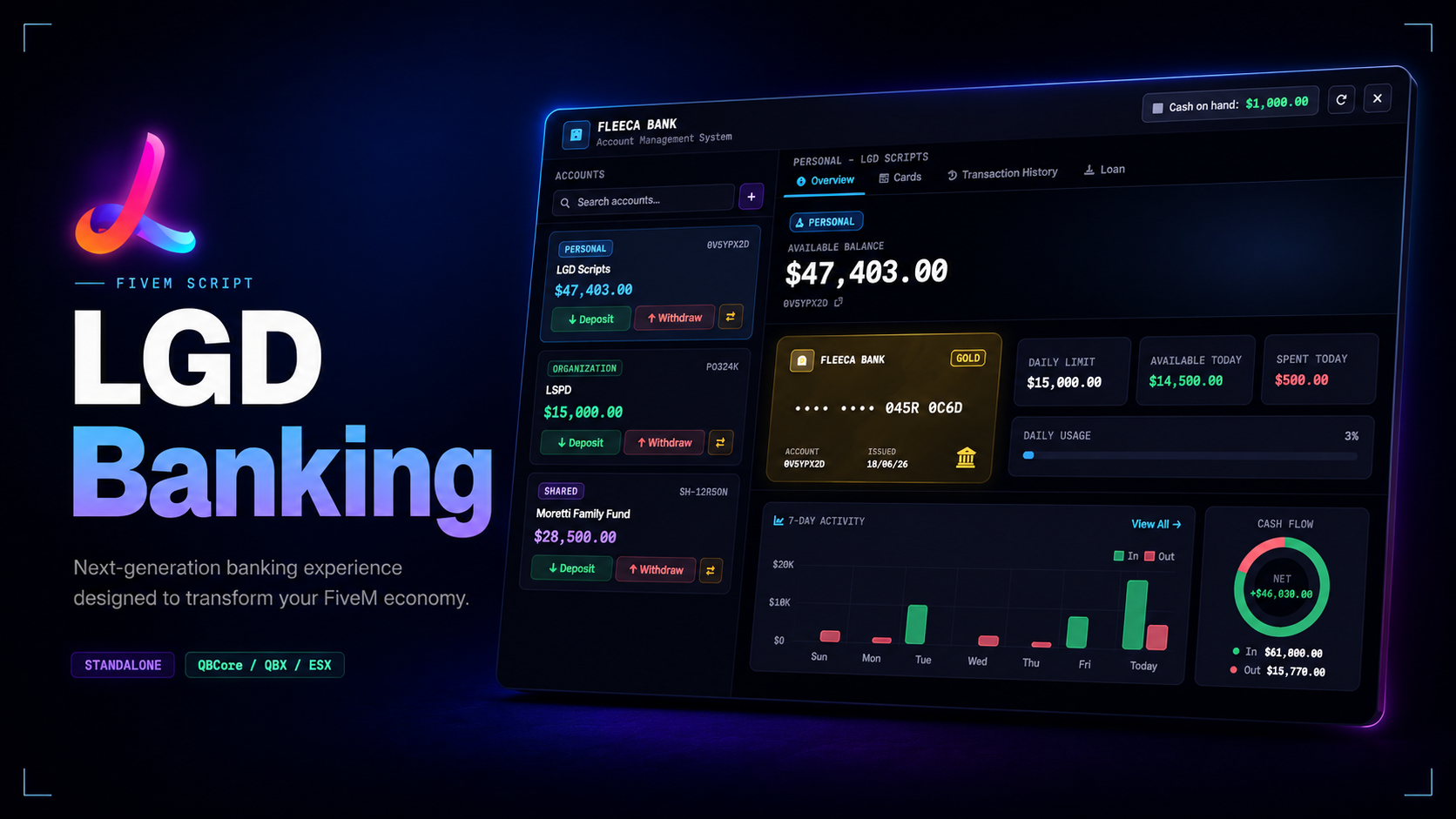
<p><strong>LGD Banking</strong> is a banking interface for FiveM that brings personal, organisation, and shared accounts into one consistent UI. The layout keeps balances, transactions, cards, loans, and member management in a single flow so bank visits feel structured instead of menu-heavy.</p>
<p>Shared accounts are the standout piece here — owners can create private accounts, review requests, assign roles, and manage access without relying on separate admin menus. Need a banking system that covers personal use, business funds, and trusted group access in the same product? This is built for that use case.</p>
<hr />
<h2>Features</h2>
<ul>
<li>
<p><strong>Account system</strong> — personal, organisation, and shared accounts are handled inside the same interface with dedicated flows for each account type</p>
</li>
<li>
<p><strong>Shared account roles</strong> — owners, managers, and associates have separate permissions for joining, managing members, and moving funds</p>
</li>
<li>
<p><strong>ATM terminal</strong> — ATM use has its own focused interface for deposits, withdrawals, transfers, and transaction history</p>
</li>
<li>
<p><strong>Card management</strong> — personal and organisation cards include tiers, fees, limits, freeze controls, and termination handling</p>
</li>
<li>
<p><strong>Loan tracking</strong> — personal and organisation loans support configurable limits, repayment windows, cooldowns, and history review</p>
</li>
<li>
<p><strong>Unified UI</strong> — the layout follows the LGD design language with account-aware colour themes, analytics panels, and motion across bank and ATM views</p>
</li>
<li>
<p><strong>Customer editable bridge</strong> — <code>shared/config.lua</code> plus the <code>framework</code> files cover the parts most servers actually need to adjust without exposing the protected core</p>
</li>
<li>
<p><strong>Framework support</strong> — works with <code>QBCore</code>, <code>QBX</code>, and <code>ESX</code> through auto-detected framework bridges</p>
</li>
<li>
<p><strong>Target support</strong> — automatically detects and uses <code>ox_target</code> or <code>qb-target</code></p>
</li>
<li>
<p><strong>Optimised</strong> — Tested with resmon: `0.00ms` idle, `0.01ms` with the bank UI open, and `0.01ms` with the ATM UI open.</p>
</li>
<li>
<p>S<strong>upport</strong> — Lifetime updates, 7-day-a-week personalized support via <a href="DISCORD_LINK_HERE">Discord</a>, and a 7-day refund policy.</p>
</li>
</ul>
<hr />
<h2>Configuration</h2>
<p>Everything is controlled from a single <code>shared/config.lua</code> file</p>
<hr />
<h2>Dependencies</h2>
<p>ox_lib — Always</p>
<p>oxmysql — Always</p>
<p>pma-voice — Always</p>
<p>ox_target — One supported target</p>
<p>qb-target — One supported target</p>
<p>qb-core — One supported framework</p>
<p>qbx_core — One supported framework</p>
<p>esx_extended — One supported framework</p>
<hr />
<h2>Installation</h2>
<ol>
<li>
<p>Drop <code>lgd-banking </code>into your resources folder</p>
</li>
<li>
<p>Add <code>ensure lgd-banking </code>to your <code>server.cfg</code> **after **<code>oxlib</code>, <code>oxmysql</code>, your framework, and either <code>ox_target</code> or <code>qb-target</code></p>
</li>
<li>
<p>Open <code>shared/config.lua</code> and set the preferred language, currency, shared account limit, and ATM options</p>
</li>
<li>
<p>Restart the server</p>
</li>
</ol>
<hr />
<h2>Performance</h2>
<p>Tested with resmon. The main interface runs only while the banking UI or ATM terminal is open, while world interaction points stay lightweight during normal play.</p>
<hr />
<h2>Support</h2>
<p>For questions, bug reports or suggestions, join our Discord.</p>
<p>Tags: esx qbcore qbox</p>
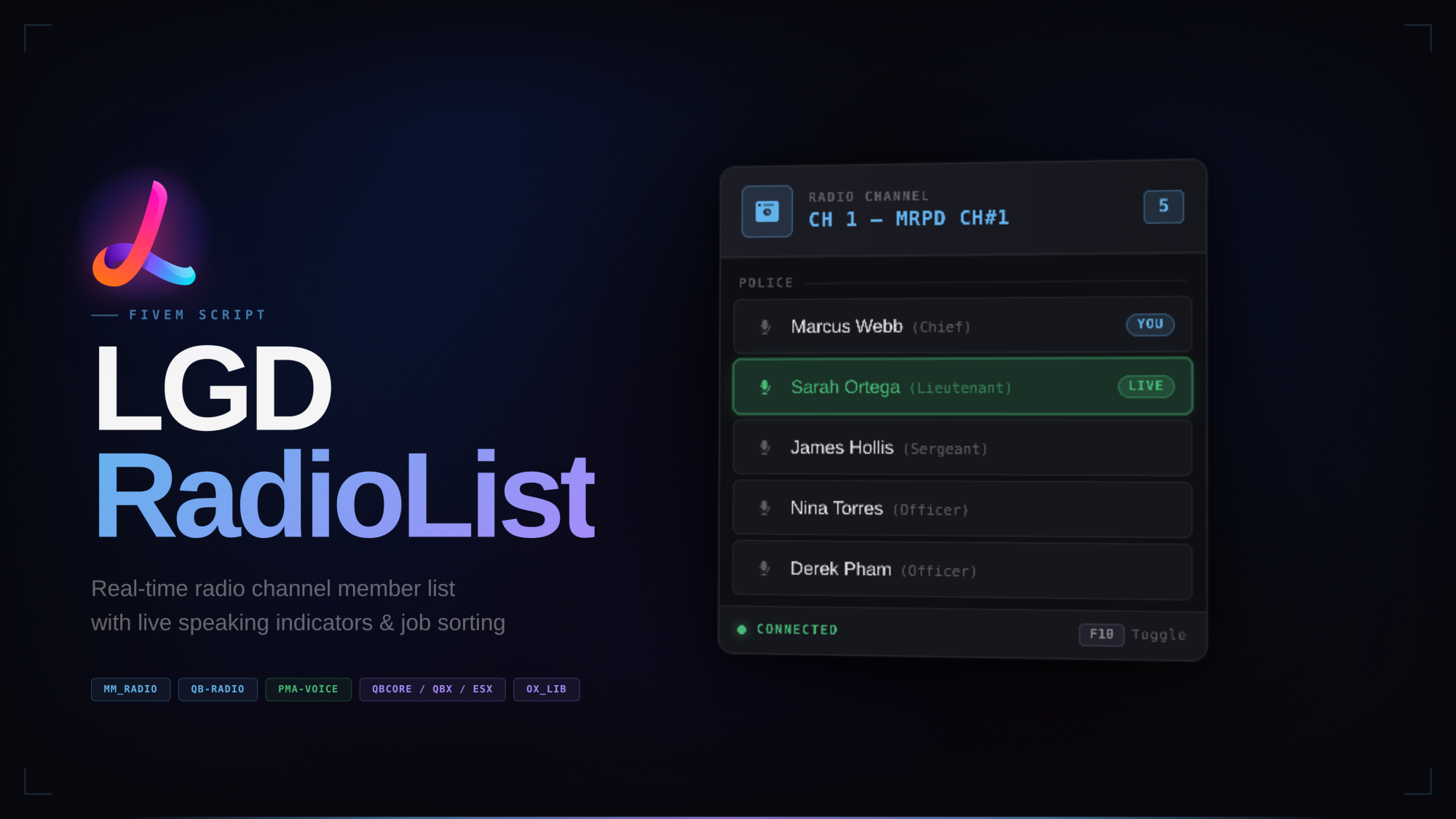
<p><strong>LGD RadioList</strong> is a clean, always-on HUD that shows your radio channel's active members directly on screen — no need to open the radio menu. Built to match the design language of modern FiveM interfaces, it integrates tightly with <strong>pma-voice</strong> to display who is currently speaking in real time.</p>
<p>Players can toggle the panel on or off with a keybind, drag it anywhere on screen, and the panel remembers its position between sessions.</p>
<hr />
<h2>Features</h2>
<ul>
<li>
<p><strong>Always-visible HUD</strong> — every member on the active radio channel is shown at a glance with no menu to open</p>
</li>
<li>
<p><strong>Live speaking indicator</strong> — the speaking player's row highlights green with a pulsing bar and a LIVE badge, powered by pma-voice events</p>
</li>
<li>
<p><strong>Job & rank sorting</strong> — members are grouped under their job header and sorted from highest to lowest grade within each group; job group order is fully configurable</p>
</li>
<li>
<p><strong>Grade label display</strong> — each player's rank name (e.g. Chief, Lieutenant, Officer) is shown in muted text after their name</p>
</li>
<li>
<p><strong>Job sorting toggle</strong> — grouping and rank sorting can be disabled from the config; when off, members are listed alphabetically with no group headers</p>
</li>
<li>
<p><strong>Draggable panel</strong> — hold a configurable key to enable the cursor and drag the panel anywhere on screen; position is saved across sessions</p>
</li>
<li>
<p><strong>Rebindable keybinds</strong> — both the toggle and drag keybinds are registered through <code>ox_lib</code> and can be rebound in GTA V's Key Bindings menu</p>
</li>
<li>
<p><strong>Multi-radio support</strong> — works with <code>mm_radio</code> and <code>qb-radio</code>, selectable from the config with a single key</p>
</li>
<li>
<p><strong>Multi-framework support</strong> — full job and grade sorting on QBCore and QBX; ESX and standalone run without job features</p>
</li>
<li>
<p><strong>Optimised</strong> — 0.00ms idle, 0.01ms spike on speaking or list update; no polling threads, all updates are event-driven.</p>
</li>
<li>
<p>S<strong>upport</strong> — Lifetime updates, 7-day-a-week personalized support via <a href="DISCORD_LINK_HERE">Discord</a>, and a 7-day refund policy.</p>
</li>
</ul>
<hr />
<h2>Configuration</h2>
<p>Everything is controlled from a single <code>shared/config.lua</code> file</p>
<hr />
<h2>Dependencies</h2>
<p>ox_lib — Always</p>
<p>pma-voice — Always</p>
<p>mm_radio — If <code>Config.RadioScript = 'mm\_radio'</code></p>
<p>qb-radio — If <code>Config.RadioScript = 'qb\_radio'</code></p>
<p>qb-core — If <code>Config.Framework = 'qbcore'</code></p>
<p>qbx_core — If <code>Config.Framework = 'qbox'</code></p>
<hr />
<h2>Installation</h2>
<ol>
<li>
<p>Drop <code>lgd-radiolist</code> into your resources folder</p>
</li>
<li>
<p>Add <code>ensure lgd-radiolist</code> to your <code>server.cfg</code> <strong>after</strong> your radio script and framework</p>
</li>
<li>
<p>Open <code>shared/config.lua</code> and set your framework and radio script</p>
</li>
<li>
<p>Restart the server</p>
</li>
</ol>
<hr />
<h2>Performance</h2>
<p>Tested with resmon. The script is entirely event-driven — no <code>Tick</code> threads are running during normal gameplay. The drag-mode safety thread runs a single <code>Wait(500)</code> loop only while the resource is active.</p>
<hr />
<h2>Support</h2>
<p>For questions, bug reports or suggestions, join our Discord.</p>
<p>Tags: esx qbcore qbox</p>